
meShare
meShare SupportLifestyle
2.42.03K Reviews
- Version
- 6.0.3.54
- Installs
- 100.00K
- Age Rating
- Everyone
Screenshots

Our Review of meShare
 Analysis by Appyee
I see the appeal of a smart-home app most clearly when it removes small, everyday hassles: checking on a room while I’m away, or getting a useful alert instead of wondering what is happening at home. meShare is a lifestyle app from meShare Support built around managing compatible smart-home products through the company’s cloud services. That focus is useful if your devices already fit into its ecosystem, but it also shapes the main question I would ask before installing it: does it work with the products I actually own?
The app is free to download and is rated for Everyone. It has an average rating of 3.1 from around four thousand ratings, so I would approach it as a practical tool to assess against my own setup rather than assume it will suit every household. Optional in-app purchases range from $0.99 to $399.99 per item, which makes checking the available options and their costs before committing especially sensible.
A cloud connection is the core idea
The most important thing to understand about meShare is that it is not a universal remote for every smart device. Its purpose is to connect compatible products with meShare’s cloud services, letting you manage them through a phone. In everyday terms, that can make a connected device easier to check when you are not standing next to it. The benefit depends on having supported equipment and a working account and connection; downloading the app by itself does not turn ordinary home products into smart ones.
That distinction matters when comparing it with the usual alternatives. A broad smart-home hub may be designed to bring products from several ecosystems into one place, while a manufacturer’s own app is typically centered on that brand’s devices. meShare makes most sense as the control point for products intended to work with its services. If your home already uses compatible equipment, a dedicated companion app may be simpler than adding another platform. If your devices are a mixed collection, first check whether meShare covers the pieces you want to control rather than expecting it to unify everything.
What setup is really asking of you
Before relying on the app, I would make setup a deliberate little project rather than a rushed download. Confirm that the specific device is compatible, have the product instructions nearby, and use the same account details consistently across the people who need access. These steps sound basic, but they prevent the common frustration of installing an app and then discovering the device or account is not ready to connect.
meShare has been available since November 18, 2014, and its current version is 6.0.3.47023. It supports Android 5.0 and later, while the app is also offered for iOS. That makes it a possible option for households with a range of phones, though I would still check the store page on each device before planning a shared setup. An older phone that cannot install the current release can become the weak link if everyone expects to use it.
One useful habit is to test the control you care about while you are still at home. Open the app, check that the intended product appears, and make sure you understand where its main controls are before you depend on it from another location. This is not a claim that every connection will behave the same way; it is simply a sensible way to catch an account or setup snag while the device is within reach.
A realistic day-to-day use
Picture leaving home in a hurry and later wanting to check a connected device without turning the moment into a full troubleshooting session. A well-prepared setup lets you open meShare, select the relevant product, and use the controls available for it. That small, specific task is a better measure of value than a long feature list: can you reach the device you need, understand what the app is showing, and finish the check without guessing?
For a household, I would also agree on who is responsible for the account and how other people should use the system. Shared access can be convenient, but unclear account ownership often makes routine changes awkward when the person who did the original setup is away. Keeping the product names recognizable and writing down the setup steps somewhere secure can save time later, especially if a family member has to use the app for the first time.
Where I would be cautious
Cloud-based control has a practical trade-off: remote access depends on the services and connections involved. If your home internet or the phone’s connection is unreliable, you should not treat an app as a guaranteed substitute for being on site. I would keep any important physical controls accessible and avoid making a household routine depend entirely on a remote check that might not load at the moment you need it.
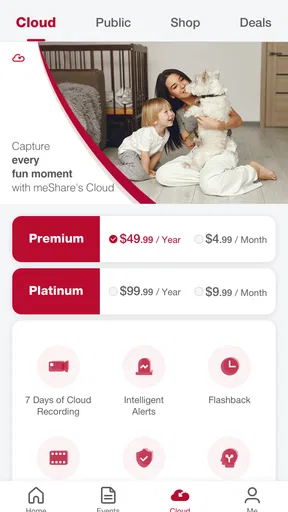
The range of optional purchases is another reason to look closely before choosing a plan or feature. A free download does not necessarily mean every service you want will be included at no cost. I would identify the exact function I need, review its price in the app, and avoid paying for a higher tier merely because it sounds more complete. The right choice depends on how often you will use the service and whether the added cost solves a real problem for your home.
It is also worth being realistic about what an app can tell you. A remote interface can make compatible products easier to manage, but it does not replace sensible home-security habits or prove that a device is functioning correctly just because it appears in the app. If your main need is a professionally monitored alarm, a dedicated security service may be a better fit than a companion app for connected products.
Who is likely to get the most from it?
I would consider meShare if I already owned compatible products, wanted a phone-based way to manage them, and preferred a focused companion app over a broad platform with controls I would never use. It may also suit someone who is comfortable checking compatibility and handling a straightforward account setup. With 100,000+ installs, it has found an audience, but that alone does not tell me whether a particular device will work in a particular home.
I would look elsewhere if I wanted one dashboard for a wide mix of unrelated brands, if I needed a service with a clearly defined professional monitoring role, or if I was unwilling to check purchase terms and device support first. In those cases, a platform explicitly built around mixed-brand integration or a specialist security provider may be more appropriate. The best alternative is the one that supports the devices and level of oversight you actually need, not the one with the longest list of controls.
Getting Started with meShare
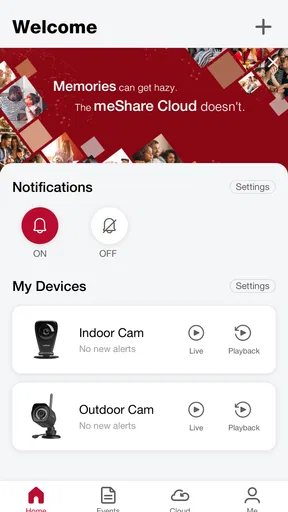
Diving into the meShare app was like slipping into a pair of comfortable sneakers. The onboarding process is intuitive and quick, which is a big win in my book. All you need is your smartphone and a dash of eagerness. Once you download the app from either the Google Play Store or Apple App Store, setting up your account is a breeze. Just a few taps and you're in!
What really caught my attention was the seamless integration with a variety of camera brands. No fussing around with compatibility issues—just sync your devices and you’re ready to roll. The app supports both Android and iOS platforms, so no one's left out of the loop.
Features that Make a Difference
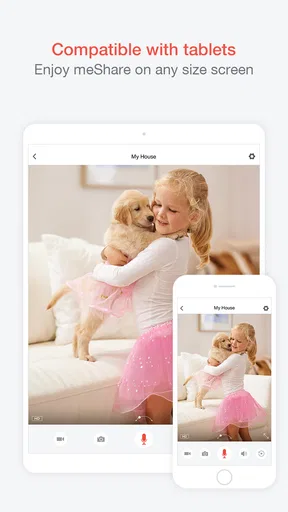
Now, let’s talk features, because that’s where the magic happens. One of the standout features for me is the live streaming capability. With just a swipe, you can check in on your home from anywhere. It's like having a window to your living room right in your pocket.
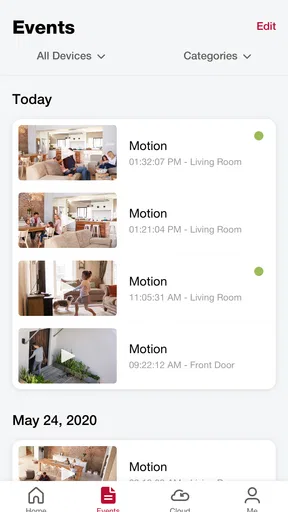
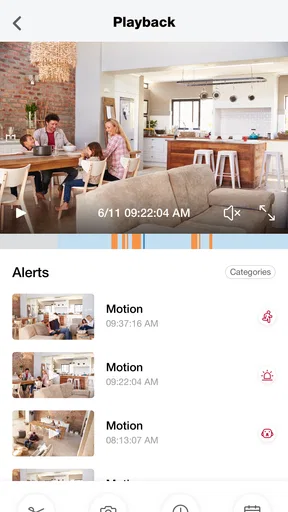
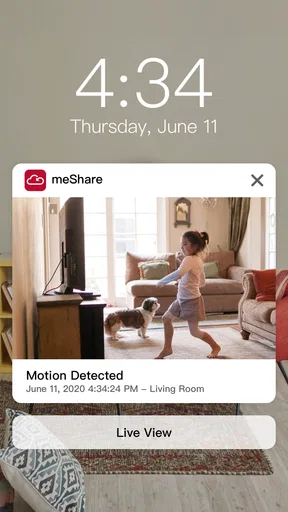
Another nifty feature is the motion alerts. The app sends you notifications if any movement is detected, and you can customize sensitivity settings to avoid any false alarms. I mean, who wants to be alerted every time a leaf blows by?
One thing I didn’t expect was the cloud storage option. It’s a lifesaver, allowing you to save important footage without worrying about losing it. Plus, meShare offers different storage plans, so you can pick what fits your needs.
User Experience and Interface
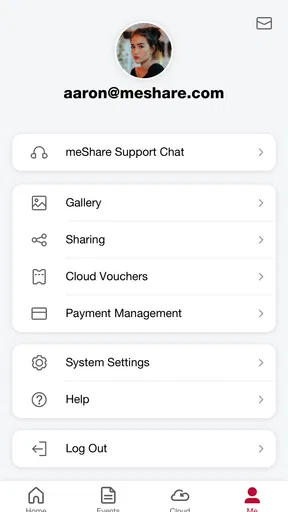
The user interface deserves a gold star. It’s clean, vibrant, and most importantly, user-friendly. Whether you’re a tech enthusiast or someone who's not so tech-savvy, navigating through the app feels like a walk in the park. Everything is right where you need it to be, and the learning curve is practically non-existent.
One feature that really resonated with me was the timeline view. It allows you to scroll through your footage chronologically, which makes finding specific events a piece of cake. The pinch-to-zoom feature on the playback screen is also a thoughtful addition, helping you get a closer look when you need it.
Connectivity and Reliability
In terms of connectivity, meShare doesn’t disappoint. Whether you’re on a WiFi network or using mobile data, the app maintains a stable connection, ensuring you’re always in the loop. During my testing, I experienced minimal lag, which is crucial for security purposes.
Reliability is another area where the app shines. The real-time alerts are prompt, and the live stream quality is consistently sharp. Knowing that I can rely on the app to perform well when it counts is a huge relief.
Final Thoughts
In conclusion, the meShare app is like having a personal security guard that fits right in your pocket. It offers a comprehensive set of features that make managing your home security a hassle-free experience. From the effortless setup to the reliable performance, it ticks all the right boxes for me.
If you’re in the market for a reliable home security management app, give meShare a whirl. It’s a solid choice that brings peace of mind with a side of convenience. So go ahead, check it out, and see how it can transform the way you stay connected to your home.
Verdict
Strengths of meShare
- User-friendly interface for easy navigation.
- Real-time alerts for enhanced security.
- Supports a wide range of devices.
- Cloud storage for convenient access.
- High-quality video streaming.
Limitations of meShare
- Limited free storage options.
- Requires stable internet connection.
- Occasional app crashes reported.
- Some features are subscription-based.
- Notifications can be delayed.
Similar Picks in This Category
View All
SmartThings
Samsung Electronics Co., Ltd.4.6

Google Home
Google LLC4.0

Pinterest4.2

Astrotalk - Talk to Astrologer
Astrology & Horoscope4.7

My Verizon
Verizon Consumer Group4.5

Samsung Wallet (Samsung Pay)
Samsung Electronics Co., Ltd.4.1
Frequently Asked Questions
What is meShare and what can I do with it?
meShare is a versatile app designed to manage and monitor smart home devices, primarily focusing on security cameras. With this app, users can view live video feeds, receive motion alerts, and access cloud storage for recorded footage. It's an essential tool for anyone looking to enhance home security and automate device management.
Is meShare compatible with all smart home devices?
While meShare supports a wide range of smart home devices, particularly security cameras, compatibility may vary depending on the brand and model. It's crucial to check the app’s compatibility list on their website or in the app store description to ensure your devices will work seamlessly with meShare.
How secure is my data with meShare?
meShare prioritizes user data security by implementing encryption protocols for data transmission and storage. The app offers secure cloud storage options to protect recorded footage. Users are encouraged to use strong passwords and enable two-factor authentication to enhance security further.
Does meShare require a subscription for cloud storage?
Yes, meShare offers a subscription plan for cloud storage, providing users with options to store and access their recorded footage over time. While there may be a free trial or basic plan available, advanced features like extended storage typically require a subscription.
How user-friendly is the meShare app for beginners?
meShare is designed with a user-friendly interface, making it accessible even for beginners. The app features intuitive navigation and clear instructions for setting up and managing devices. Additionally, meShare offers customer support and helpful resources to assist users who may need extra guidance.
